Find out how a Salesforce Audit helps you fix what slows you down and make your CRM work the way your business does.
It usually starts quietly. A new field here, a quick automation there. Someone adds a report to track a new metric, another person customises a dashboard “just for now.” Months later, the system that once felt sharp and intuitive starts to feel cluttered. Data doesn’t line up. Teams complain that Salesforce is slowing them down instead of helping them move faster.
That’s when most companies realise something’s off, but few can pinpoint exactly what. Is it the data? The automations? The way people are using it?
That’s where a Salesforce Audit proves its worth. It’s a focused way to uncover what’s working, what’s not, and how to make your CRM perform the way it was meant to.
If you’ve ever felt that Salesforce could be doing more for your business, keep reading. This might be the most useful check-up your organisation can do.
What is a Salesforce Audit?
A Salesforce Audit is a deep dive into how your Salesforce works for you. It looks at how your teams use it, where data gets stuck, and whether your setup still matches the way your business actually operates today.
Over time, Salesforce tends to collect “digital clutter”: extra fields, old automations, unused reports, custom objects nobody remembers creating. The audit clears that noise, exposes what’s slowing you down, and shows you where the platform can start working for you again, instead of the other way around.
It’s part detective work, part optimisation, and part strategy session. The goal is to make Salesforce easier to use, more insightful, and perfectly tuned to your goals.
In short, because Salesforce is never really “done.” It keeps evolving with new users, new processes, new automations. What once made sense can slowly turn into something nobody quite controls. A Salesforce Audit helps you step back and see the full picture.
Identify inefficiencies
Small inefficiencies pile up quietly: duplicate data, workflows that trigger twice, manual steps that could be automated. An audit highlights where effort is being wasted and how to make Salesforce simpler, faster, and cleaner.
Increase adoption
If your team finds Salesforce confusing, they’ll avoid it. An audit helps uncover what’s getting in their way, like cluttered layouts or irrelevant fields, so you can design an experience people actually want to use.
Ensure compliance and security
User permissions and data access tend to drift over time. A structured audit brings visibility into who can see what, ensuring your data stays protected and compliant with internal and external standards.
When should you run an audit?
There’s no “perfect” time, but there are definitely moments when a Salesforce Audit can make all the difference. The truth is, most companies wait until frustration builds up. The best ones don’t. They treat an audit as part of staying sharp.
1. When Salesforce starts to feel heavy
If your team says Salesforce is “slow,” “messy,” or “not worth the effort,” it’s time. These are usually signs of cluttered data, redundant automations, or confusing processes that have quietly accumulated.
2. Before you scale
Growth amplifies everything, good and bad. If you’re expanding teams, entering new markets, or launching new products, an audit ensures your foundation is solid before you build on it.
3. When reports stop telling the truth
If dashboards no longer match what’s happening on the ground, you’re probably looking at inconsistent data or misaligned metrics. An audit gets your reporting back to reality.
4. Ahead of a major integration or upgrade
Planning to connect Salesforce with another platform, or move to a newer version? Auditing first helps you clean the house, avoid technical debt, and make the transition seamless instead of chaotic.
5. As routine maintenance
Just like you wouldn’t drive a car for years without a service, you shouldn’t let Salesforce run unchecked. A yearly or biannual audit keeps performance high, data healthy, and users happy.
Types of Salesforce audits
Not every business needs the same kind of audit. Sometimes you need a deep technical clean-up; other times, you just need clarity on how people are using the platform. The best approach depends on what’s holding you back, but here are the main types to consider.
A Salesforce data audit uncovers duplicates, outdated records, and inconsistent formats that undermine your reporting and decision-making. The goal is simple: rebuild trust in your data so every number tells the truth.
Security & Access Audit
As teams grow, permissions often drift, leaving data exposed or users with access they no longer need. This audit reviews roles, profiles, and sharing rules to ensure your information stays protected, without slowing down collaboration.
Configuration Audit
Salesforce setups tend to bloat. Custom fields, workflows, validation rules, triggers, all added with good intentions, but not always with long-term structure. A Configuration Audit identifies what’s essential, what’s redundant, and how to streamline everything for efficiency and clarity.
Performance Audit
If Salesforce feels sluggish or processes take too long, a Performance Audit digs into what’s behind it, The result: faster load times, smoother user experience, and more responsive dashboards.
Adoption & Experience Audit
Even the most advanced setup fails if people don’t use it. This audit focuses on behaviour, meaning how teams actually interact with Salesforce day-to-day. It uncovers friction points, training gaps, and UX issues that affect adoption and productivity.
If you suspect your Salesforce could be doing more for you, you’re probably right. And we can show you exactly how.
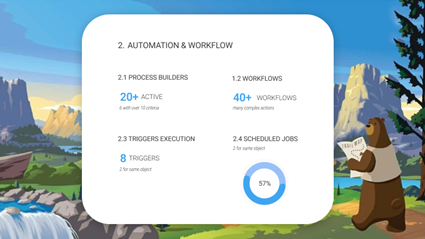
Our approach starts with understanding your business context: what’s working, what’s slowing you down, and where you want to go. Then we bring in our free Salesforce Audit & Utilization Report, a free proprietary audit that analyses your configuration, automations, data quality, and user behaviour. It highlights inefficiencies, redundancies, and risks, giving us a clear picture of where value is leaking.
From there, we don’t hand you a 200-page report and say “good luck”. We deliver a ranked list of issues (what needs fixing now, what can wait), practical steps you can act on, organised by impact and effort, and a roadmap that helps you decide whether to address things in phases or take a bigger leap. And did we mention it’s free?